Authorization
Overview
We support two methods for authorizing the calls you make to the eBay APIs:
-
OAuth—eBay APIs use the OAuth 2.0 protocol for application and user authorization. OAuth is the industry standard for assuring your online transactions are secure. You must provide a valid access token for each request you make to the eBay interfaces. OAuth access tokens verify to eBay that a request is coming from a valid application and that the application has the user's authorization to carry out the requests. You can also use OAuth tokens with eBay Traditional APIs.
Important: If you use Traditional APIs like the Trading API, we recommend that you use OAuth, but eBay's older Auth'n'Auth process is still available for older applications.
The OAuth scopes assigned to your application allow it to access specific API resources and methods. A valid OAuth token can successfully authorize a request only if the token was generated with the scope required by the target method.
You can see the OAuth scopes for your application in Application Keys.
-
Auth’n’Auth—The authentication and authorization technology used by eBay Traditional APIs.
Working with OAuth scopes
OAuth scopes grant your application access to the different methods and resources. The OAuth tokens you use to authorize your requests must have the OAuth scope required by the methods and resources you are trying to access.
No matter which type of OAuth access token you generate, you must supply the set of scopes for the functionality you will be accessing with the generated token.
In another way, a valid OAuth token can successfully authorize a request only if the token was generated with the scope required by the target method.
The assignment of scopes
Scopes and access
Specifying scopes when minting access tokens
Getting the list of scopes assigned to your application
Scopes and grant flows
Scopes and refresh tokens
The assignment of scopes
Once signed in to the Developers Program, you can generate application keys for both the Sandbox and Production environments.
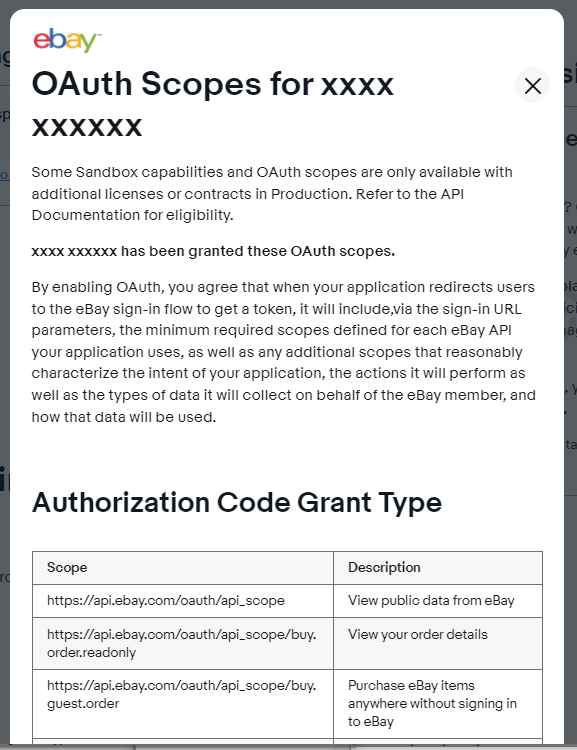
When generated, each set of application keys is assigned a set of scopes where each scope gives the application access to different API methods, resources, and functionality.
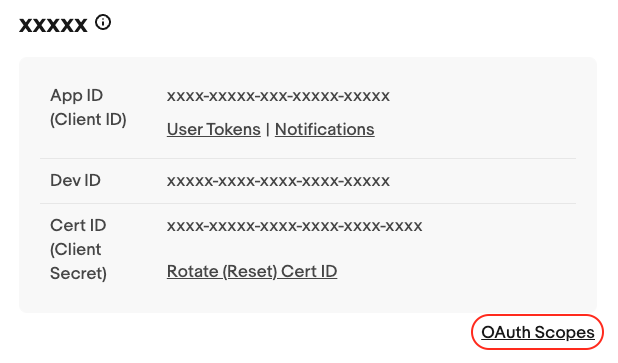
You can view the sets of scopes assigned to your application keyset through the Application Keys page in the developer portal.
Click the OAuth Scopes link that is displayed in the lower-right of the image below to get the list of scopes for your application:
Scopes and access
Each scope assigned to an application keyset determines:
- The set of resources that can be accessed with the scope.
- The set of operations that can be performed with the scope.
The request you use to generate the new token must include a list of scopes that allows access to all the methods you plan to call with the token.
To discover the scopes you need for your application, refer to the OAuth scope section of the API documentation for each method you use in your application. Then, mint your access tokens using at least one of the scopes listed for each method you call. In this way, each access token will contain the authorization needed to make all the requests.
Specifying scopes when minting access tokens
Whichever flow you use to generate OAuth access tokens, you must always supply a valid list of scopes with your request to generate the token.
eBay OAuth access tokens are minted through the OAuth token service. The way you pass scopes depends on the grant flow you use. See The client credentials grant flow and The authorization code grant flow for details.
Getting the list of scopes assigned to your application
When you create a set of application keys, a set of scopes is assigned to your application keyset.
The Developers Program offers a sample request for both the Sandbox and Production environments, and you can use these samples to get a string of the scopes that have been assigned to your application.
To get the list of scopes assigned to your application keyset for either the Sandbox or Production environment:
- Log in to the eBay Developer Program and navigate to Your Account > Application Keys.
-
Click the User Tokens link that's displayed next to the Client ID of the environment you want to target:
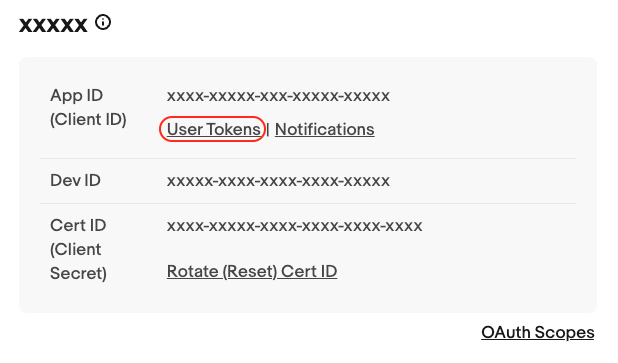
This displays the User Tokens (eBay Sign-In) page.
-
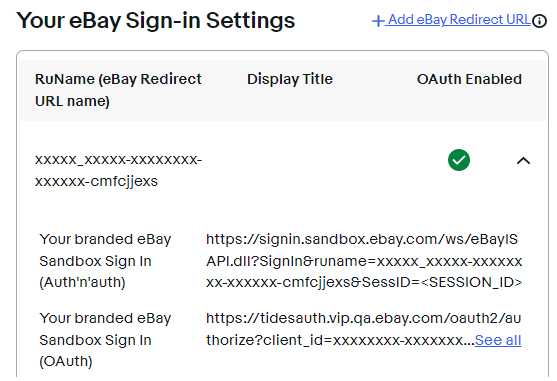
Under the Get a Token from eBay via Your Application heading, after configuring an RuName, an RuName box similar to the following displays:
-
To view a complete sample request, click the See all link.
Copy from the sample the full value of the
scopeparameter to get a list of scopes assigned to your application. - URL-encode the
scopevalue when you send it with your request to the token server.
When you copy the scopes in this manner, you can end up using a larger set of scopes than is needed by your application. The user scopes imply a permission grant, and users must consent to all the permissions your scopes represent before they can use your application.
Be aware, it's possible the Sandbox and Production environments support different sets of scopes for your application. When supplying the string of scopes in your token requests, be sure to match the scopes to the environment you're targeting.
Scopes and grant flows
The eBay token service mints access tokens via two different grant flows:
-
Client credentials grant flow mints a new Application access token.
-
Authorization code grant flow mints a new User access token.
Each flow uses a different process to generate access tokens, and the grant flow you use depends upon the scopes assigned to the eBay methods used in your application.
The client credentials grant flow is used to mint application tokens, which can be used if the application is accessing or working with resources and data that is not specific to an eBay user. Good examples of methods that require application tokens are metadata or taxonomy calls.
The authorization code grant flow is used to mint user tokens, which are used for methods that post or return data that is specific to an eBay user. There are a lot more methods that require user tokens than application tokens. The OAuth scope section in each method's reference page indicates which tokens are needed for that method.
Scopes and refresh tokens
When creating a User access token, you must supply a list of scopes in your consent request. (See Getting the list of scopes assigned to your application.) For more details, see The authorization code grant flow.
When requesting a refresh token, you can either:
-
include an optional scope parameter to supply a list of scopes; or
-
include no scope parameter and default to the set of scopes included in the consent request.
Get OAuth access tokens
eBay APIs use the OAuth 2.0 protocol for application and user authorization. OAuth is the industry standard for assuring your online transactions are secure and you must provide a valid access token for each request you make to the eBay REST interfaces.
OAuth access tokens verify to eBay that a request is coming from a valid application and that the application has the user's authorization to carry out the requests.
Once you obtain a valid access token, use it to authorize a request.
Important! You must have an active eBay Developer Program account to get the OAuth 2.0 client credentials you need to create access tokens.
Minting access tokens
The eBay token service generates, or mints, access tokens via two different grant flows:
- Client credentials grant flow mints a new Application access token that you can use to access the resources owned by the application.
- Authorization code grant flow mints a new User access token that you can use to access the resources owned by the user.
The eBay OAuth client libraries
eBay offers several client libraries that you can use to quickly implement the minting of OAuth tokens in your applications:
- OAuth client library for Android
- OAuth client library for C#
- OAuth client library for Java
- OAuth client library for Node.js
- OAuth client library for Python
Implementing OAuth in your applications
The following topics describe how to implement the minting of OAuth tokens using each of the two grant flows:
Getting your redirect_uri value
The requests to get user access tokens require a redirect_url value that is used for authorization, as well as a URL to redirect the user to after they have completed the permissions grant request. Instead of a URL, the OAuth flow requires a custom RuName value that eBay generates and assigns to your application.
About RuName values
The RuName contains several pieces of information, including the accept URL and reject URLvalues, which lets you customize different pages, depending on how the user responds to the permissions grant request.
Your application has two unique RuName values, each supports either the Sandbox or Production environments.
Getting your RuName values
To get the RuName:
- Log in to the eBay Developer Program and navigate to Your Account > Application Keys (if you followed the above step, you're already here).
-
Click the User Tokens link that's displayed next to your Client ID:
This displays the Get a Token from eBay via Your Application drop-down.
-
Click the Get a Token from eBay via Your Application drop down, the following screen displays:
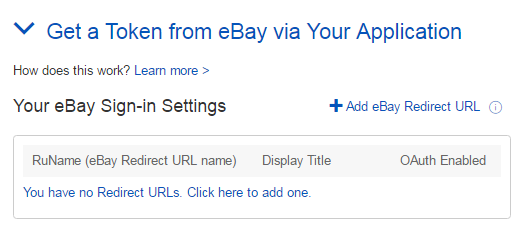
-
If you have not yet created an RuName (also known as an eBay Redirect URL name), click the link labeled You have no Redirect URLs. Click here to add one.
This displays the Confirm the Legal Address for the Primary Contact or Business form.
-
Complete the form to confirm your contact information, then click the Continue to create RuName button.
The RuName value is displayed on the resulting screen:
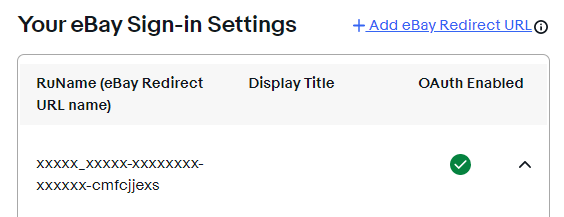
The RuName value for the Sandbox environment
If you are only using Application token, you do not need to fill out the rest of the RuName fields. URLs to your privacy policy and your accept and decline URLs are needed only if you are using User access tokens.
If you are using User tokens, fill out the rest of the RuName form, as detailed below.
Configuring the RuName value
The Get a Token from eBay via Your Application box contains various fields that configure the RuName for User tokens. These are shown in the screen below:
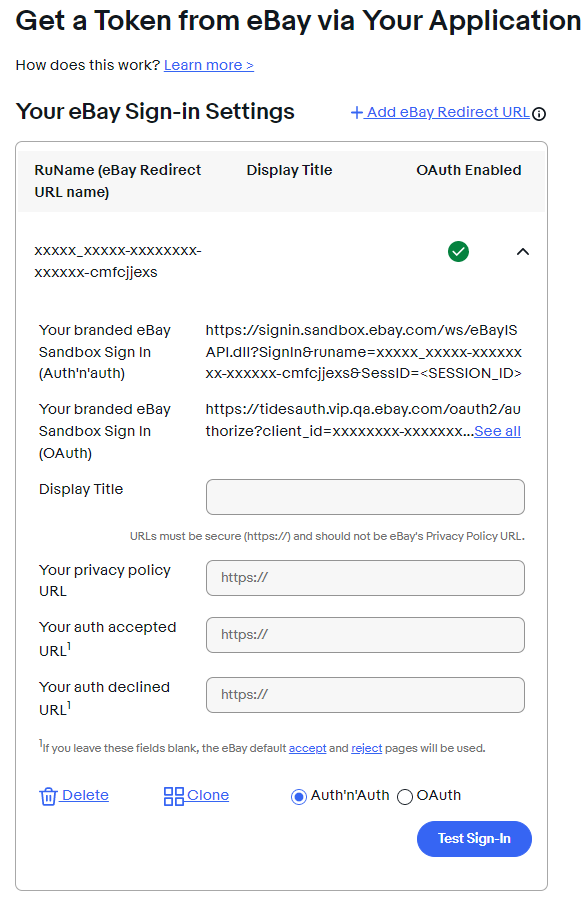
The RuName value for the Sandbox environment
Configure the following fields before using the RuName to create a User token:
| Field Name | Description |
|---|---|
|
Display Title |
The title that eBay displays at the top of the Grant Application Access page during the client-grant flow. |
|
Privacy Policy URL |
Enter the URL where you host your privacy policy. This policy states how you use the eBay information that your application can access when a user grants permission to your application. |
|
Auth Accepted URL |
eBay redirects the user to this URL if the user grants your application the permissions it needs to act upon their behalf. |
|
Auth Declined URL |
eBay redirects the user to this URL if the user does not grant your application the permissions it needs. |
Generating your Base64-encoded credentials
To authorize an API request, set the value of the Authorization header to the Base-64 encoded value of your application's OAuth credentials.
Before encoding the credentials, combine them by listing the client_id value, a colon, then the secret value.
In other words, Base64 encode the following: <client_id>:<client_secret>
For the Authorization header value, precede your B64-encoded credentials with the word "Basic " and a space, as demonstrated here:
Basic <B64-encoded_oauth_credentials>
When you navigate to get your application keys, you can quickly generate a short-lived (two hours or less) Application access token or User Access token through the user interface.
Getting Application access tokens via the Developer Portal
To get an Application access token:
- Navigate to your Application Keys page on the eBay Developer Portal.
- Next to the App ID listing of the environment you want to generate a token for, click the User Tokens link.
- On the resulting page, click the Get OAuth Application Token link, an example which is highlighted in the following screen:

Getting an Application token through the Web flow
You can use this Application token to make requests to the APIs in the environment for which the token was generated.
Getting User access tokens via the Developer Portal
You can also generate a User access token through the Developer Portal.
To generate a User access token through the Developer Portal:
- Navigate to your Application Keys page on the eBay Developer Portal.
- Next to the App ID value (for Production or Sandbox environment), click the User Tokens link.
- In the Get a User Token Here section, select the OAuth (new security) radio button, then click the sign-in button.
If you are generating a Production user token, a real eBay user's credentials will be provided. If you are generating a Sandbox user token, a Sandbox test user's credentials will be provided. - On the Grant Application Access page (which is determined by the Accept URL setting), click the Agree button.
The User access token is returned.
You can use this User token to make requests to the APIs in the environment for which the token was generated. However, because the User access token is short lived, you will likely want to programmatically generate your User tokens, including using the Refresh token to update your User tokens after they expire. See Using a refresh token to update a User access token.
OAuth best practices
This topic discusses the details and best practices for working with the eBay OAuth implementation.
Security and OAuth tokens
Access tokens are short lived—they expire quickly for security reasons—while refresh tokens are valid for an extended period of time. Refresh tokens are limited in functionality, however, and you can only use them to get a new access token (you cannot use refresh tokens to authorize requests).
Even though you cannot make a call with a refresh token, you must still consider them as sensitive and you must store them in a secure location. Like an access token or client secret, if the value of a refresh token is considered compromised, you should take immediate action to limit any possible repercussions that could stem from its misuse.
Important! OAuth tokens and credentials MUST be treated as confidential and must not be shared or exposed publicly. For the best performance and security, applications should store access tokens in memory and re-use them until they expire.
The tokens you mint with the OAuth token requests work only in the environment for which the token was minted. There are three token requests for User access tokens, and you must be sure to align the target environment for each request.
When you test with User access tokens, you need to get "consent" from your Sandbox test user accounts. However, once you've finished testing, get Production access tokens by redoing the access-token flow using your Production OAuth credentials and the Production URLs. To do so, start the process afresh from the consent request step, as outlined in the topic Getting the third-party consent. The difference here is that you will be getting consent from the real users of your app, and not your Sandbox test accounts.
OAuth token best practices
The following list presents some best practices for working with access tokens and their rate limits:
- Access tokens are short-lived in that they expire relatively quickly after they have been minted. This is a security measure meant to keep ill-intended users from abusing access tokens. Use an access token until it expires, then create a new one using either a client credentials grant for Application access tokens or a refresh token grant for User access tokens.
- Refresh tokens are long-lived, but they can be unexpectedly revoked. For example, the associated user can change their eBay user name or they can revoke their consent. In addition, eBay can revoke a token for various reasons. With these scenarios in play, your application needs to gracefully handle User access token revocations.
- Refresh tokens are valid for an extended period of time. When a refresh token expires, you must issue another permissions grant request to mint a new User access token for the respective user.
- Even while access tokens are short lived, eBay strictly enforces a daily rate limit on the number of tokens you can mint with each type of grant request. Make sure your application stays within the request limits for your OAuth tokens.
- Create your User access tokens using all the scopes needed for the current capabilities in your application, plus any capabilities you plan to add to the application. Adding a new scope to an existing User access token requires a new permission grant from each of your users, and they might balk at multiple consent requests.
- Create tokens using only the scopes your application needs. For example, there is no need to specify a read-only scope if the corresponding view and manage scope is also being specified.
- Store your OAuth credentials and refresh tokens on a secure server to prevent them from being hacked and used by bad actors for corrupt or possibly unlawful behavior.
Access token rate limits
To help prevent nefarious use of the eBay APIs, each application has a limit on the number of requests it can make to the OAuth endpoint in any one 24-hour day. The number of requests allocated to an application is called the rate limit for that application.
The OAuth rate limits are assigned to the endpoint that an application uses to mint OAuth access tokens (https://api.ebay.com/identity/v1/oauth2/token), and the rate limits are different for each grant_type value. The following table shows the rate limits for the different types of grant_type values:
| Grant type | Access Token Type | Rate Limit |
|---|---|---|
|
Client credentials grant (grant_type = |
Application access token | 1,000 requests/day |
|
Authorization code grant (grant_type = |
User access token | 10,000 requests/day |
|
Refresh token grant (grant_type = |
User access token | 50,000 requests/day |
The client credentials grant flow
Sequence for getting and using an application access token
Configuring the request
The client credentials grant request
This topic describes how to mint OAuth access tokens using the client credentials grant flow.
The access token retrieved from this process is called an Application access token.
OAuth client libraries
The processes in this topic describe how to manually get OAuth tokens. To help with this process, eBay offers several client libraries that you can use to quickly implement the minting of OAuth tokens in your applications:
- OAuth client library for Android
- OAuth client library for C#
- OAuth client library for Java
- OAuth client library for Node.js
- OAuth client library for Python
Sequence for getting and using an application access token
The following sequence diagram outlines the client credentials grant flow, where an Application access token is minted, then used in an API request:
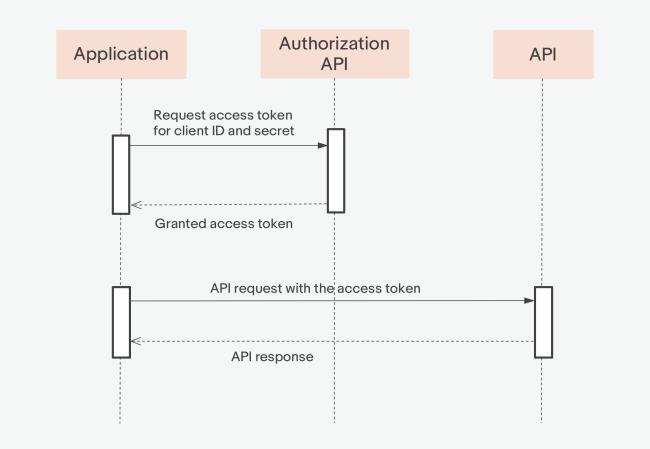
Sequence diagram for generating an Application access token
Configuring the request
You need to configure three parts of a client credentials grant request:
- Setting the target endpoint
- Configuring the HTTP request headers
- Configuring the request payload
Setting the target endpoint
The endpoint you use depends on the environment you're targeting:
|
Environment |
Endpoint (HTTP method + URL) |
|---|---|
| Sandbox | POST https://api.sandbox.ebay.com/identity/v1/oauth2/token |
| Production | POST https://api.ebay.com/identity/v1/oauth2/token |
Configuring the HTTP request headers
Set the following HTTP request headers:
- Content-Type – Must be set to:
application/x-www-form-urlencoded -
Authorization – The word "
Basic" followed by your Base64-encoded OAuth credentials (<client_id>:<client_secret>).For details, see Generating your Base64-encoded credentials.
Configuring the request payload
Format the payload of your POST request with the following values:
- Set grant_type to
client_credentials. -
Set scope to the URL-encoded space-separated list of the scopes needed for the interfaces you call with the access token.
For details, see Specifying scopes when minting access tokens.
With Application access tokens, the application has an inherent authorization to make eBay calls.
The client credentials grant request
The client credentials grant is a single request that mints a new Application access token. Use the token to make requests to API methods that match the scopes configured into the access token.
Configure your request using the following call specifics:
  HTTP method:   POST
  URL (Sandbox): https://api.sandbox.ebay.com/identity/v1/oauth2/token

  HTTP headers:
    Content-Type = application/x-www-form-urlencoded
    Authorization = Basic <B64-encoded-oauth-credentials>

  Request body:
    grant_type=client_credentials
    scope=<scopeList>   // a URL-encoded string of space-separated scopes
Tip: The example on this page targets the Sandbox. Be sure to update the endpoint shown if you want to target the Production environment.
Example cURL request
The following command shows how to configure the client credentials grant request with cURL:
curl -X POST 'https://api.sandbox.ebay.com/identity/v1/oauth2/token' \
  -H 'Content-Type: application/x-www-form-urlencoded' \
  -H 'Authorization: Basic UkVTVFRlc3...wZi1hOGZhLTI4MmY=' \
  -d 'grant_type=client_credentials&scope=https%3A%2F%2Fapi.ebay.com%2Foauth%2Fapi_scope %20https%3A%2F%2Fapi.ebay.com%2Foauth%2Fapi_scope%2Fbuy.item.bulk'
Response containing the Application access token
When you issue a client credentials grant request, eBay returns a JSON object that contains an Application access token, as shown in this response:
  {
    "access_token": "v^1.1#i^1#p^1#r^0#I^3#f^0#t^H4s ... wu67e3xAhskz4DAAA",
    "expires_in": 7200,
    "token_type": "Application Access Token"
  }
To use an access token to authorize an API request, pass the token value in the Authorization HTTP header.
In the above example, the expires_in element is set to 7,200 seconds, meaning this token is valid for two hours from the time it was generated. For continued access after the token expires, you must mint a new token.
Important! Access tokens must be treated as confidential and must not be shared or exposed publicly. For best performance and security, applications should store this token in a static variable and re-use the token while it is valid.
The authorization code grant flow
Getting user consent
Exchanging the authorization code for a User access token
Using a refresh token to update a User access token
The authorization code grant flow is used to create an OAuth User access token.
OAuth client libraries
The processes in this topic describe how to manually get OAuth tokens. To help with this process, eBay offers several client libraries that you can use to quickly implement the minting of OAuth tokens in your applications:
- OAuth client library for Android
- OAuth client library for C#
- OAuth client library for Java
- OAuth client library for Node.js
- OAuth client library for Python
Sequence for getting and using a user access token
The following sequence diagram outlines the authorization code grant flow, where a User access token is minted, then used in an API request:
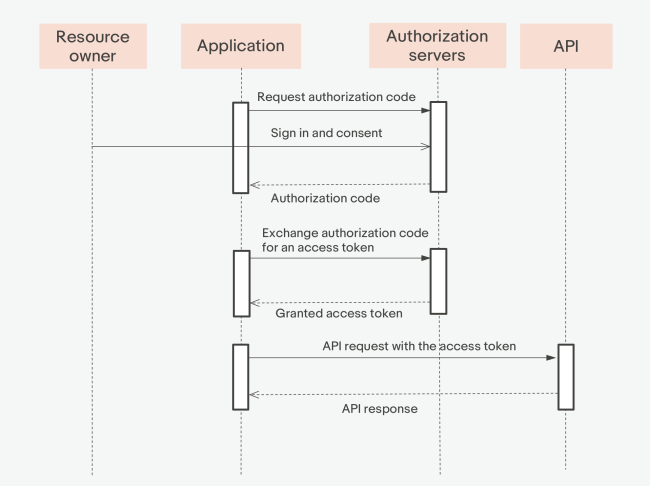
Sequence diagram for generating a User access token
Getting a new access token for a user through the authorization code grant flow is a two-step process. First get consent from the eBay user to make API calls on their behalf (see Getting user consent), and then generate the User access token for each user (see Exchanging the authorization code for a User access token).
Getting user consent
This topic covers user consent, the first step you must take to get User access token for a specific user.
About user consent
If your eBay application acts on the behalf of an eBay user, your application must obtain the user's consent before it can make requests that access and update that user's confidential resources.
After gaining the eBay user's consent, make an authorization code grant request to mint a new User access token, a token that carries a user's authorization to let your application access the user's eBay account data.
Configuring the consent request
You need to configure two parts of the redirect URL:
- Setting the target endpoint
- Configuring the HTTP query parameters
The eBay Sandbox and Production environments host Grant Application Access pages on different servers. The following table lists the supported endpoints:
|
Environment |
Endpoint (HTTP method + URL) |
|---|---|
| Sandbox | GET https://auth.sandbox.ebay.com/oauth2/authorize |
| Production | GET https://auth.ebay.com/oauth2/authorize |
Set the following query parameters to configure your consent request:
| Query Parameter | Description |
|---|---|
|
|
The client_id value for the environment you're targeting. Occurrence: Required |
|
|
The locale parameter to localize the OAuth consent page for the marketplace you're targeting. For example, set Occurrence: Optional |
|
|
If needed, you can force a user to log in when you redirect them to the Grant Application Access page, even if they already have an existing user session. To do so, set the prompt query parameter to Occurrence: Optional |
redirect_uri |
The RuName value for the environment you're targeting. For details, see Getting your redirect_uri value. Occurrence: Required |
|
|
Set to " Occurrence: Required |
|
|
A list of OAuth scopes that provide access to the resources used by your application. For details, see Using OAuth to access eBay APIs Occurrence: Required |
|
|
An opaque value used by the client to maintain state between the request and callback. The authorization server returns the same value supplied in the request when it redirects the user-agent back to the client's accept URL. While the state value is optional, we recommend you supply this value and use it to prevent cross-site request forgery, as described in Section 10.12 of the OAuth spec. Occurrence: Optional |
You obtain user consent via your application's Grant Application Access page, a custom page that asks the user to grant your application the permissions it needs to access the user's eBay account resources.
From your application, direct the user to your application's Grant Application Access page using an HTML redirect that we call the "consent request."
The following consent request is an HTML redirect that targets the Sandbox (the example has been wrapped for readability):
/* URL redirects a user to the application's Grant Application Access page */

GET https://auth.sandbox.ebay.com/oauth2/authorize?
	client_id=<app-client-id-value>&
	locale=<locale-value>&          // optional
	prompt=login                    // optional
	redirect_uri=<app-RuName-value>&
	response_type=code&
	scope=<scopeList>&              // a URL-encoded string of space-separated scopes
	state=<custom-state-value>&     // optional
This HTML request redirects a user to your application's Grant Application Access page. If they consent to the conditions outlined on the page, the redirect returns the user to your application, and the redirect back to your application contains an authorization code.
The Grant Application Access lists the permissions your app needs to access and modify the specific confidential resources that are in your application's control. The list of permissions presented on the Grant Application Access page, and the full list of permissions to which the third-party must consent, is determined by the list of scopes supplied in your permissions grant request.
The list of permissions your app needs to access the eBay APIs determined by the list of scopes supplied in your permissions grant request. The more scopes you include in your permissions grant request, the more permissions the user needs to consent. To trim the list of permissions that the user must consent to, supply only the scopes required to access the methods used in your application, and leave out any scopes that signal access to resources that your application doesn't use.
The Grant Application Access page displays information about the items you're asking the user to grant access permission for your application. The page contains an Agree and Continue button that the user can click to indicate consent (it also contains a Not now button to indicate denial).
The Grant Application Access page has several links that provide information about the grant request and links that forward the user back to the seller's application. The seller configures much of the links and content on this page through their eBay Developer Program account. (See Getting your redirect_uri value for more details.)
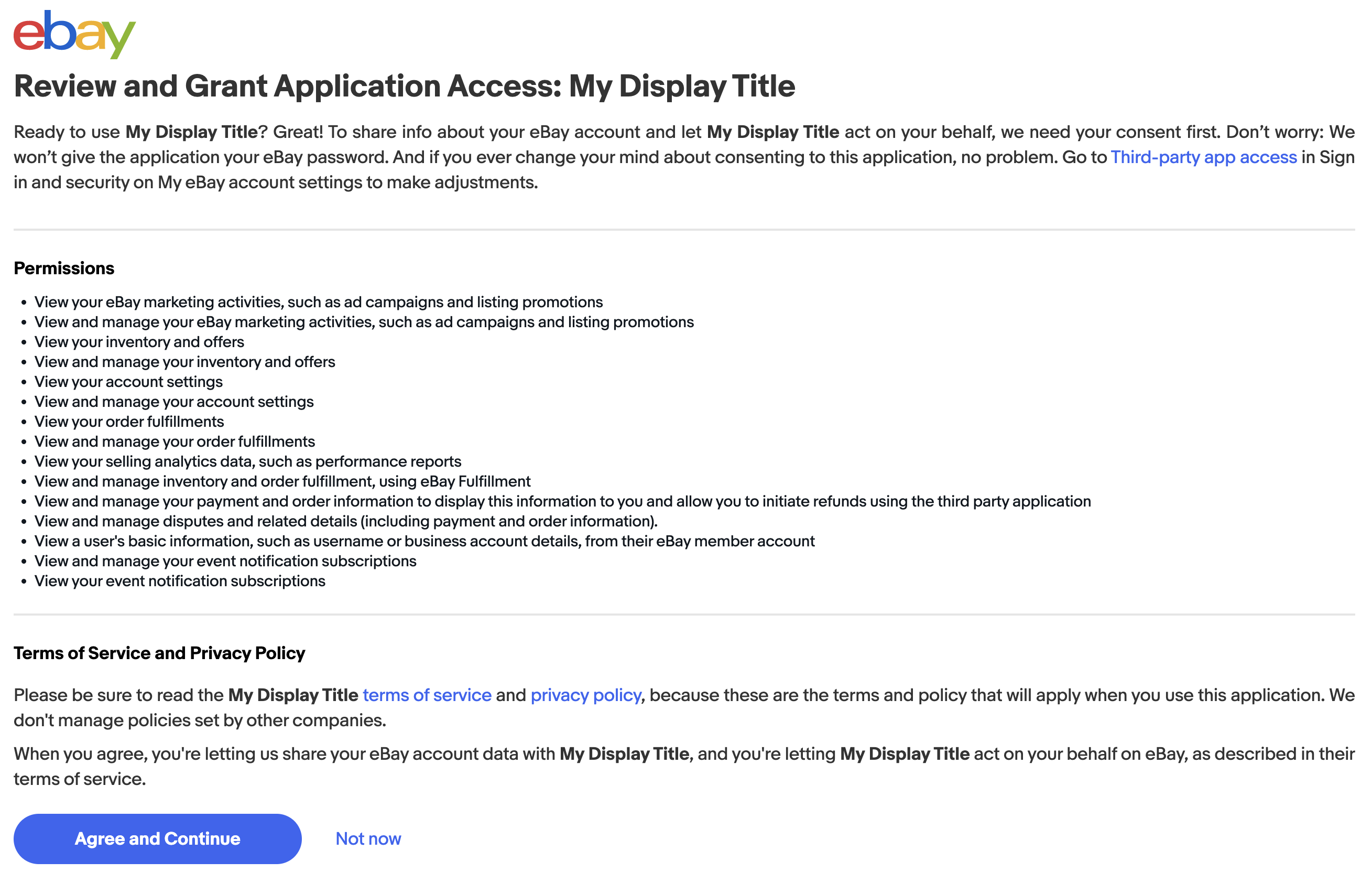
An example Grant Application Access page
If the user grants consent by clicking the "I Agree" button on the Grant Application Access page, eBay redirects them back to the seller's Accept URL page (configured with the seller's RuName). The redirect back to your application includes an authorization code , which indicates the user's consent.
  /* The redirect to your Accept URL page with the appended authorization code and state value */

  https://www.example.com/acceptURL.html?
    state=<client_supplied_state_value>&
    code=v%5E1.1% ... NjA%3D&
    expires_in=299
The example above shows how the authorization code value is returned in the code parameter. The authorization code is tied a single user and you exchange the code for a User access token that is also tied to that user.
If you supplied a state parameter in your consent request, it is also returned in the redirect URL. eBay highly recommends you use this parameter to check for cross-site request forgery (CSRF) attacks.
The authorization code returned from the authorization code grant is a single-use token that can be used only to retrieve an access token. You cannot use the authorization code to make API requests.
In addition to the code value, the response URL also contains an associated expires_in value that defines the number of seconds the authorization code is valid. Use the authorization code before it expires to obtain a User access token that you can use to make API requests on the user's behalf.
For details, see Exchanging the authorization code for a User access token.
Exchanging the authorization code for a User access token
When a user grants your application the authorization to take action on their behalf, eBay returns an authorization code that contains the user's consent for the specified scopes. Use the authorization code in a POST request that's commonly known as an authorization code grant request. This request gets a User access token and its associated refresh token.
The authorization code is a maximum of 1024 characters in length. Do not store this value, instead use the value only as a run-time parameter that's passed directly to the authorization code grant.
Configuring the request
You need to configure three parts of a client credentials grant request:
- Setting the target endpoint
- Configuring the HTTP request headers
- Configuring the request payload
The endpoint you use depends on the environment you're targeting:
|
Environment |
Endpoint (HTTP method + URL) |
|---|---|
| Sandbox | POST https://api.sandbox.ebay.com/identity/v1/oauth2/token |
| Production | POST https://api.ebay.com/identity/v1/oauth2/token |
Set the following HTTP request headers:
- Content-Type – Must be set to:
application/x-www-form-urlencoded -
Authorization – The word
Basicfollowed by your Base64-encoded OAuth credentials (<client_id>:<client_secret>)For details, see Generating your Base64-encoded credentials.
Format the payload of your POST request with the following values:
- Set grant_type to
authorization_code. -
Set redirect_uri to the RuName value assigned to your application and the environment you're targeting.
For details, see Getting your redirect_uri value.
-
Set code to the URL-encoded authorization code value returned to you by eBay when the user granted their consent.
For details, see Getting the third-party's consent.
Tip:The authorization code returned by eBay is URL-encoded. This value must be URL-encoded when you pass the value in the code parameter of the authorization code grant request. However, if the method you use to make the request URL-encodes the values you pass, then you must URL-decode the authorization code before using it the authorization code grant request.
The authorization code grant request
The authorization code grant is a request that mints a new User access token. Use the token to make requests to API methods that match the scopes configured into the access token.
Configure your request using the following call specifics:
  HTTP method:   POST
  URL (Sandbox): https://api.sandbox.ebay.com/identity/v1/oauth2/token

  HTTP headers:
    Content-Type = application/x-www-form-urlencoded
    Authorization = Basic <B64-encoded-oauth-credentials>

  Request body:
    grant_type=authorization_code
    code=<authorization-code-value>
    redirect_uri=<RuName-value>
The following command shows how to configure the authorization code grant request with cURL (wrapped for readability):
curl -X POST 'https://api.sandbox.ebay.com/identity/v1/oauth2/token' \
  -H 'Content-Type: application/x-www-form-urlencoded' \
  -H 'Authorization: Basic RGF2eURldmUtRG2 ... ZTVjLTIxMjg=' \
  -d 'grant_type=authorization_code&
      code=v%5E1.1%23i%5E1%23f% ... 3D%3D&
      redirect_uri=Davy_Developer-DavyDeve-DavysT-euiukxwt'
When you issue the authorization code grant request, eBay returns a JSON object containing the fields shown here:
  {
    "access_token": "v^1.1#i^1#p^3#r^1...XzMjRV4xMjg0",
    "expires_in": 7200,
    "refresh_token": "v^1.1#i^1#p^3#r^1...zYjRV4xMjg0",
    "refresh_token_expires_in": 47304000,
    "token_type": "User Access Token"
  }
Use the access token to authorize your API requests.
Because this example targets the Sandbox environment, this access token can be used to make API calls to only the Sandbox. To make requests to the Production environment, repeat the token-generating process using the Production environment values (the OAuth credentials, RuName, and URLs) in each of the token requests you sent to eBay.
About the User access token
The expires_in value returned with the newly-minted User access token indicates the number of seconds that token is valid.
In the example above, the token remains valid for 7,200 seconds (2 hours) from the time it was generated. After the token expires, you will need to renew it using the supplied refresh token.
While User access tokens are short-lived, the associated refresh_token is a long-lived value that you can use to update an expired User access token. This means you do not have to get the user's consent each time you need a new User access token.
To update the access token after it expires, see Using a refresh token to update a User access token.
Using a refresh token to update a User access token
When you mint a new User access token, the access token is returned along with a refresh token, which you can use to renew the User access token for the associated user. A refresh token request mints an access token that contains the same authorization properties as the original access token.
About refresh tokens
For security, a User access token is short-lived. However, a refresh token is long-lived and you can use it to renew a User access token after the token expires. The benefit is that you don't need to get the account-owner's consent each time you need to renew their User access token.
The sequence for using a refresh token
The application can make API calls on the eBay user's behalf as long as the access token associated with their account is valid. If the access token is expired, renew the User access token using the following logic:
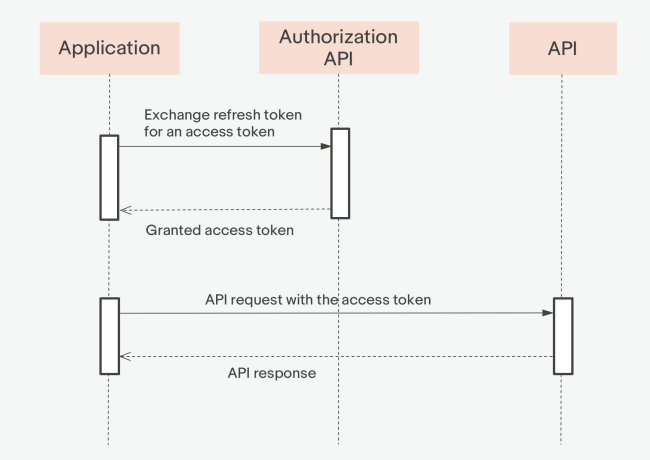
Sequence diagram for generating a User access token with a refresh token
Configuring the refresh token request
You need to configure three parts of a refresh token request:
- Setting the target endpoint
- Configuring the HTTP request headers
- Configuring the request payload
The endpoint you use depends on the environment you're targeting:
|
Environment |
Endpoint (HTTP method + URL) |
|---|---|
| Sandbox | POST https://api.sandbox.ebay.com/identity/v1/oauth2/token |
| Production | POST https://api.ebay.com/identity/v1/oauth2/token |
Set the following HTTP request headers:
- Content-Type – Must be set to:
application/x-www-form-urlencoded -
Authorization – The word
Basicfollowed by your Base64-encoded OAuth credentials (<client_id>:<client_secret>)For details, see Generating your Base64-encoded credentials.
Format the payload of your POST request with the following values:
- Set grant_type to
refresh_token. -
Set refresh_token to the refresh token value returned from the authorization code grant request.
To get a refresh token, you must mint a new User access token.
This process starts with Getting the user's consent. -
Set scope to the same URL-encoded list of scopes that you used in the original consent request.
For details on scopes, see Using OAuth to access eBay APIs.
Note:
The scope parameter is optional. If you do not specify a scope parameter, the default will be the set of scope values included in the consent request. If you do specify a scope parameter, the included scope values must be equal to or a subset of the scope values included in the consent request.
The refresh token request
To update an expired User access token using a refresh token request, configure the target URL, HTTP headers, and request payload as shown here:
  HTTP method:   POST
  URL (Sandbox): https://api.sandbox.ebay.com/identity/v1/oauth2/token

  HTTP headers:
    Content-Type = application/x-www-form-urlencoded
    Authorization = Basic <B64-encoded-oauth-credentials>

  Request body:
    grant_type=refresh_token
    refresh_token=<your-refresh-token-value>
    scope=<scopeList>   // a URL-encoded string of space-separated scopes
The following command shows how to configure the refresh token request with cURL (the code has been wrapped for readability):
curl -X POST 'https://api.sandbox.ebay.com/identity/v1/oauth2/token' \
  -H 'Content-Type: application/x-www-form-urlencoded' \
  -H 'Authorization: Basic RGF2eURldmUtRG2 ... ZTVjLTIxMjg=' \
  -d 'grant_type=refresh_token&
      refresh_token=v^1.1#i^1#p^3# ... fMSNFXjEyODQ=&
      scope=https://api.ebay.com/oauth/api_scope/sell.account%20
            https://api.ebay.com/oauth/api_scope/sell.inventory'
When you issue the refresh token request, eBay mints a fresh access token and sends it back in a JSON response similar to the following:
  {
    "access_token": "v^1.1#i ... AjRV4yNjA=",
    "expires_in": 7200,
    "token_type":"User Access Token"
  }
You can continue to use the refresh token to mint new User access tokens for a specific user, as long as the refresh token associated with their account is valid. Note, however, that if the long-lived refresh token expires, or if you update the scopes needed by your app, you must update both the access token and the refresh token, starting with Getting the third-party consent.
While you can track the lifespan of each access token and refresh them before they expire, the amount of processing and storage needed to track the lifespans of multiple tokens often outweighs the processing needed to refresh a token once it has expired. For this reason, it is best to refresh each access token after it expires (and you receive an "Invalid access token" error), rather than trying to renew each token before it expires.
Important!Refresh tokens can be revoked due to various merchant activity on eBay. Specifically, if a seller changes their eBay member log-in name or the password for their eBay account, any active refresh tokens associated with the account will be automatically revoked by eBay. In addition, sellers can choose to revoke a token themselves via their eBay account pages.
If your refresh token gets revoked (or if it expires), then you must redo the consent-request flow in order to get a new access token and refresh token for the associated user.
OAuth token introspection and revocation
eBay offers the following endpoints for users to manage OAUTH tokens. These endpoints allow users to:
- Validate access and refresh tokens.
- Retrieve token metadata.
- Revoke tokens securely.
- Support logout and session termination flows.
- Enforce centralized token lifecycle management.
Base URL
https://api.ebay.com/identity/v1/oauth2/token
Authentication
Both token endpoints require OAuth client authentication. The following client authentication methods are supported:
|
Authentication Method |
Supported |
|
client_secret_basic |
Yes |
|
client_secret_post |
Yes |
|
private_key_jwt |
Optional |
|
mTLS |
Optional |
The following authentication method is recommended:
Authorization: Basic <base64(client_id:client_secret)
Token Introspection
The OAuth token introspection endpoint allows authorized resource servers or clients to query the authorization service about the current status of an OAuth 2.0 token.
This endpoint returns information about the token’s status, as well as additional metadata associated with the token. This endpoint if primarily used for:
- Opaque token validation
- Real-time authorization checks
- Session validation
- Centralized token lifecycle enforcement
- Security-sensitive APIs
Endpoint
POST /introspect
Request headers
|
Request Header |
Required? |
Description |
|
Authorization |
Yes |
Client authentication credentials |
|
Content-Type |
Yes |
application/x-www-form-urlencoded |
|
Accept |
Optional |
application/json |
Request parameters
|
Request Parameter |
Required? |
Type |
Description |
|
token |
Yes |
string |
The access token or refresh token to be introspected. |
|
token_type_hint |
No |
string |
A hint about the token type. |
Supported token_type_hint values
The following token_type_hint values are supported:
- access_token: The token is an access token
- refresh_token: The token is a refresh token
Response payload
|
Output Field |
Type |
Description |
|
active |
boolean |
This boolean indicates whether the token is currently active or not. |
|
scope |
string |
The OAuth scopes associated with the token. |
|
client_id |
string |
The unique identifier of the OAuth client. |
|
username |
string |
The username of the resource owner. |
|
token_type |
string |
The token type. |
|
exp |
number |
The expiration timestamp (Unix epoch) |
|
ita |
number |
The issued-at timestamp. |
|
nbf |
number |
The not-before timestamp. |
|
sub |
string |
The subject identifier. |
|
aud |
string or array |
The intended audience. |
|
iss |
string |
The token issuer. |
Note that if the token is invalid, expired, revoked, malformed, or unknown the authorization server will only return “active”: false
Errors
Invalid client authentication
HTTP Status Code:
401 UnauthorizedResponse:
{
  "error": "invalid_client",
  "error_description": "Client authentication failed"
}
Invalid request
HTTP Status Code:
400 Bad RequestResponse:
{
  "error": "invalid_request",
  "error_description": "Missing required parameter: token"
}
Sample
Request:
curl --request POST \
  --url https://api.ebay.com/identity/v1/oauth2/token/introspect \
  --header 'Authorization: Basic base64(client_id:client_secret)' \
  --header 'Content-Type: application/x-www-form-urlencoded' \
  --data 'token=eyJhbGciOi...' \
  --data 'token_type_hint=access_token'
Response:
200 OK{
"active": true,
"scope": "https://api.ebay.com/oauth/api_scope/sell.inventory",
"client_id": "my-client-id",
"username": "user@example.com",
"token_type": "Bearer",
"exp": 1735689600,
"iat": 1735686000,
"nbf": 1735686000,
"sub": "123456789",
"aud": "https://api.ebay.com",
"iss": "https://api.ebay.com/identity"
}
Security considerations
TLS Requirement
The introspection endpoint MUST be exposed only over HTTPS/TLS.
Authorization
Only authorized resource servers or clients may introspect tokens.
The authorization server should:
- Validate client permissions
- Restrict token visibility
- Enforce audience validation
- Apply rate limiting
Caching
Resource servers MAY cache introspection responses briefly to improve performance.
Recommended cache duration:
- 1–5 minutes for access tokens
- Shorter durations for highly sensitive APIs
Token Revocation
The OAuth token revocation endpoint allows OAuth clients to notify the authorization server that a token is no longer needed.
Upon successful revocation:
- The token becomes invalid.
- Associated sessions MAY be terminated.
- Related refresh/access tokens MAY also be revoked.
Common use cases include:
- User logout
- Application uninstall
- Security compromise
- Credential rotation
Request headers
|
Request Header |
Required? |
Description |
|
Authorization |
Yes |
Client authentication credentials |
|
Content-Type |
Yes |
application/x-www-form-urlencoded |
Request parameters
|
Request Parameter |
Required? |
Type |
Description |
|
token |
Yes |
string |
The access token or refresh token to be introspected. |
|
token_type_hint |
No |
string |
A hint about the token type. |
Supported token_type_hint values
The following token_type_hint values are supported:
- access_token: The token is an access token
- refresh_token: The token is a refresh token
Successful response
Upon a successful call, an HTTP Status Code 200 OK is returned, alongside an empty response body.
Errors
Unsupported token type
HTTP Status Code:
400 Bad Request
Response:
{
  "error": "unsupported_token_type",
  "error_description": "Token type is not supported"
}
Invalid client authentication
HTTP Status Code:
401 Unauthorized
Response:
{
  "error": "invalid_client",
  "error_description": "Client authentication failed"
}
Sample
Request:
curl --request POST \
  --url https://api.ebay.com/identity/v1/oauth2/token/revoke \
  --header 'Authorization: Basic base64(client_id:client_secret)' \
  --header 'Content-Type: application/x-www-form-urlencoded' \
  --data 'token=eyJhbGciOi...' \
  --data 'token_type_hint=refresh_token'
Response:
200 OKRevocation Semantics
Access Token Revocation
Revoking an access token invalidates that specific token immediately.
Refresh Token Revocation
Revoking a refresh token MAY also revoke:
- Associated access tokens.
- Related authorization grants.
- Active user sessions.
Best Practices
- Use HTTPS only.
- Implement rate limiting to prevent:
- Token enumeration attacks
- Brute-force introspection attempts
- ABuse of revocation APIs
- Log the following events:
- Introspection requests
- Revocation requests
- Failed authentication attempts
- Suspicious token activity
- Prefer short-lived access tokens. Recommended token lifetimes are 5-60 minutes for Access Tokens and days to months for Refresh Tokens.
Understand Auth`n`Auth tokens
There are two application use cases, or models. The models differ only by the number of users supported by the application.
In the Single User Model, the application supports only a single user. In this model, you need only one Auth'n'Auth token. You can generate a single token for your application's user with the User Tokens (eBay Sign-In) page in your developer account. An Auth'n'Auth token created in the Production environment is associated with an eBay user ID, and an auth'n'auth token created in the Sandbox environment is associated with a Sandbox test user.
In the Solutions Provider Model, the application supports multiple users. For this you would want to implement the ability to get user tokens directly from within your application. The following sections describe how to configure your application to get tokens for eBay users, how to get tokens that will enable users to make use of your application, how to use tokens, and how to replace them when they expire.
The following tutorial walks you through setting up your application to receive tokens and receiving a token for a user.
Life Span and Uniqueness
Typically, an application obtains a user token for each user via the user sign-in and consent process and stores the token for subsequent use. If you will be storing user tokens in a database, here's what you need to know.
-
It can be up to 2KB in length and is base 64 encoded
-
It can contain: a to z, A to Z, 0 to 9, asterisk, slash, plus ( * / +)
Tokens are valid for 18 months across multiple sessions of the application. Seven (7) days before a token is due to expire, eBay returns the expiration date in the HardExpirationWarning Element field in the response of all calls the application makes on behalf of that eBay user. When your application detects this field, it must redirect the user to the sign-in page on the eBay site by the date in this warning, or the token ceases to work as a means to authenticate that eBay user.
Applications are notified at least seven days before the expiration of a token at the end of its lifetime, so that they can initiate the process of generating a new token for the user. A new token is usually generated before the old one actually expires. But note, the creation of a new token for a given application/user combination invalidates the prior token.
eBay recommends messaging end users several months before the token expiration date to ensure the user has plenty of time to reauthorize your application. Keep track of the date on which you created the token, and assume that it should be valid for 18 months unless otherwise indicated by eBay.
If a token expires and no new token is generated, the application will be unable to make API calls in that user's name. This has no effect on the user's eBay account or any other application that they use. Once a new token has been generated, the application will again be able to make function calls on that user's behalf. See Token Expiration Causes for a list of what can cause a token to expire.
Once a token has expired, all calls using that token will fail with error 932: "Auth token is hard expired." To avoid unexpected user token failures, your application should include logic to handle this error.
Hard Expiration Warning Element
In SOAP-formatted calls, the seven-day warning is returned in the HardExpirationWarning element. The element is returned in the header of the response to an API call made within the 7-day warning period.
<?xml version="1.0" encoding="utf-8"?>
<soap:Envelope xmlns:soap="http://schemas.xmlsoap.org/soap/envelope/"
               xmlns:xs="https://www.w3.org/2001/XMLSchema"
               xmlns:ebl="urn:ebay:apis:eBLBaseComponents">
  <soap:Header>
    <ebl:RequesterCredentials soapenv:mustUnderstand="0">
      <HardExpirationWarning>
      ... DATE OF EXPIRATION HERE ...
      </HardExpirationWarning>
    </ebl:RequesterCredentials>
  </soap:Header>
... Call body ...
</soap:Envelope>
XML Seven-Day Warning Response
<?xml version="1.0" encoding="UTF-8"?>
  <GeteBayOfficialTimeResponse xmlns="urn:ebay:apis:eBLBaseComponents">
  <Timestamp>2005-01-12T18:29:48.312Z</Timestamp>
  <Ack>Success</Ack>
  <CorrelationID>00000000-00000000-00000000-00000000-00000000-00000000-0000000000
  </CorrelationID>
  <Version>393</Version>
  <Build>20050110220901</Build>
  <HardExpirationWarning>2005-01-14 03:34:00</HardExpirationWarning>
</GeteBayOfficialTimeResponse>
Revoked tokens
EBay users can revoke tokens by going to the Third-party app access page in My eBay.
When a user revokes a token for an application, that token expires immediately. Any API calls made with the expired token fail with an error (error code 16110). eBay revokes a token due to security concerns
If eBay detects suspicious activity that indicates a possible security compromise of an account or application, all affected user tokens are revoked immediately. Any API calls made with the revoked token fail (error code 17470).
Get Auth`n`Auth tokens
Here is a summary of the process that results in your application getting a token for a user:
-
A user indicates a desire to use your application.
-
Your application requests a session ID from eBay, and receives one.
-
Your application constructs a URL that contains the session ID and an identifier for your application, and uses this URL to send the user to the eBay sign-in page.
-
The user signs in to eBay.
-
eBay serves the user the consent form for your application.
-
The user consents.
-
If your application hosts an AcceptURL, eBay serves the user back to that URL.
-
Your application requests a token for the user, who is identified in the request by the session ID.
-
eBay returns a token to your application.
Getting a token is a slightly different process for web-enabled applications (which can host AcceptURL and RejectURL) than it is for client desktop applications (which do not host URLs).
The following sections describe the processes for client/desktop applications and for web applications.
Client/Desktop Applications
Use this method of getting tokens if there is no web component to your application, or you do not wish to host an AcceptURL or RejectURL page.
In this process, some of the steps are completed by the user, some by eBay, and some by your application.
-
A user indicates an intention to use your application (for example, by clicking a Subscribe button in your application interface).
-
Your application makes a GetSessionID request to eBay, and receives a session ID (SessionID).
GetSessionID is described in reference detail at GetSessionID.
Your application uses the session ID to construct an eBay sign-in URL that sends the user to the eBay sign-in page and consent form.
-
Use the following URL to redirect a user to the eBay sign-in page:
https://signin.ebay.com/ws/eBayISAPI.dll?SignIn&RUName=RUName&SessID=SessionIDThe URL must include
&SessID=SessionID and &RUName=RUName. SessionID identifies the user and RUName the application. The SessionID must be URL-encoded in the sign-in URL.The equivalent URL for the Sandbox is:
-
SignIn&RUName=RUName&SessID=SessionID. The user signs in on the eBay sign-in page. -
eBay forwards the user to your application's consent form.
-
The user consents or rejects your application.
-
eBay forwards the user to an eBay page that confirms their action.
-
Your application calls FetchToken to retrieve the user token.
Here is a summary of the process that results in your web application getting a token for a user:
See Getting a Token via FetchToken.
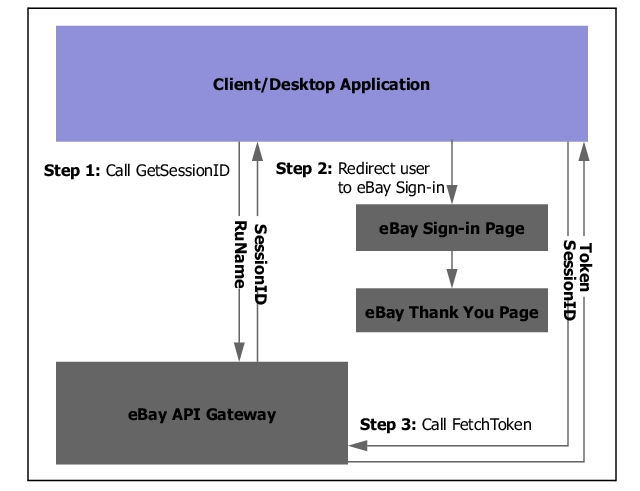
Option 1: User Sign-in Flow Ends on eBay; Client/Desktop Application Uses FetchToken to Retrieve Token
Web/Server Applications
Use this method for getting tokens if your application has a web component and can respond to being redirected to the URLs specified in your developer account.
In this process, some of the steps are completed by the user, some by eBay, and some by your application.
-
A user indicates an intention to use your application (for example, by clicking a Subscribe button in your application interface).
-
Your application makes a GetSessionID request to eBay.
GetSessionID is described in reference detail at GetSessionID.
-
Your application receives session ID (SessionID).
-
Your application constructs an eBay sign-in URL that sends the user to the eBay sign-in page and consent form.
Sign-in URL for production tokens:
https://signin.ebay.com/ws/eBayISAPI.dll?SignIn&RUName=
							RUName
						&SessID=
							SessionID
Sign-in URL for Sandbox:
https://signin.sandbox.ebay.com/ws/eBayISAPI.dll?SignIn&RUName=
							RUName
						&SessID=
							SessionID
In the URL, SessionID identifies the user and RUName the application. SessionID must be URL-encoded in the sign-in URL. It is the session ID that was obtained by calling GetSessionID.
Note that in a web application, you can construct an eBay sign-in URL using an HTML form that contains a Submit button. For example:
<INPUT TYPE=\"submit\" NAME=AUTHORIZE VALUE=\"Launch Auth & Auth\" onclick=\"window.open('https://signin.ebay.com/ws/eBayISAPI.dll?SignIn&RUName=$RUName&SessID=$SessionID');\">\nYour application can use an additional parameter in the sign-in URL,
ruparams, to hold user data that you want passed back to your application after the user consents. After user consent, eBay adds theruparamsinformation to the URL that directs the user back to your AcceptURL or RejectURL page. This data is not used in any way by eBay.The data you pass in
ruparamsmay consist of zero or more pieces of information, each in a variable name and URL-encoded value format. When eBay redirects to your application's AcceptURL or RejectURL, the value of ruparams is URL decoded into name-value pairs. For example, if the application sends this:...&ruparams=VarA%3DB12309%26VarB%3DABC123eBay returns this in the URL:
...&VarA=B12309&VarB=ABC123 -
The user signs in on the eBay sign-in page.
-
eBay forwards the user to your application's consent form.
-
In the consent form, the user consents or rejects your application.
-
eBay redirects consenting users back to the application's AcceptURL, and rejecting users to the application's Reject URL.
-
If you have passed user data in
ruparamsin the sign-in URL, eBay appends this data to the AcceptURL or RejectURL.Your application should present rejecting users with a meaningful error or message indicating that the application will be unable to make API calls in the user's name (that is, the user cannot use your application).
-
The application calls FetchToken to retrieve the user token.
See Getting a Token via FetchToken.
With one-time setup complete, your application can respond to prospective users and get tokens for them.
If the application only has one user, the same process outlined in the Getting access tokens through the Developer Portal can also be used for Auth'n'Auth user tokens. The process for getting user tokens for both OAuth and Auth'n'Auth are basically the same, except that the Auth'n'Auth radio button will be selected in the User Tokens page.
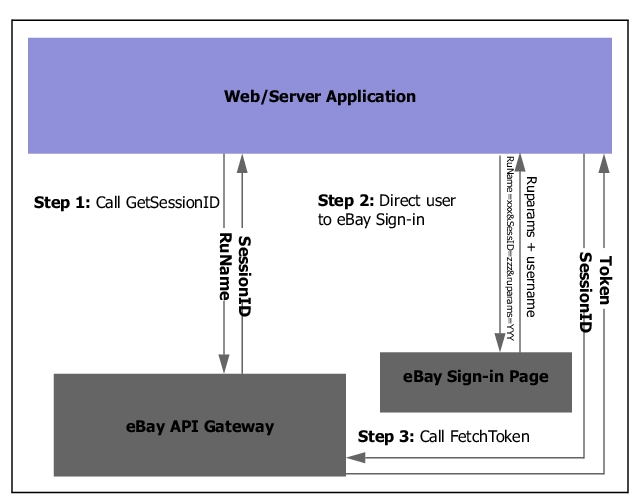
Sign-in Web Application Flow Returns User to Web Application; Application Uses FetchToken to Retrieve Token
Getting a Token via Fetch Token
Once the processes described in Client/Desktop Applications or Web/Server Applications have been completed, from your desktop or web application use FetchToken to retrieve tokens for its users.
When a user hits the eBay sign-in URL your application constructed during the consent process, eBay generates a user token and stores it with a user's session ID for 48 hours.
If this is your application's first time using this process to obtain a token for a user, your application should wait 5-10 seconds before calling FetchToken.
This section contains examples of using FetchToken.
FetchToken is described in reference detail in FetchToken.
The SOAP API example below shows a FetchToken call with the requester credentials in the SOAP header:
Fetching a Token Programmatically with SOAP
<?xml version="1.0" encoding="utf-8"?>
<soap:Envelope xmlns:soap="http://schemas.xmlsoap.org/soap/envelope/"
xmlns:xs="https://www.w3.org/2001/XMLSchema"
xmlns:ebl="urn:ebay:apis:eBLBaseComponents">
  <soap:Header>
    <ebl:RequesterCredentials soapenv:mustUnderstand="0">
	 <Credentials>
	   <AppId>MyAppID</AppId>
	   <DevId>MyDevID</DevId>
	   <AuthCert>MyCertID</AuthCert>
	 </Credentials>
    </ebl:RequesterCredentials>
  </soap:Header>
  <FetchTokenRequest xmlns="urn:ebay:apis:eBLBaseComponents">
	<SessionID>MySessionID</SessionID>
	<Version>1169</Version>
  </FetchTokenRequest>
</soap:Envelope>
Instead of passing in application keyset values into the Credentials container in the request payload, you can also pass the application keyset values in through HTTP headers. The XML API example below shows the FetchToken call with the requester credentials in the HTTP header:
X-EBAY-API-APP-NAME:MyAppID
X-EBAY-API-DEV-NAME:MyDevID
X-EBAY-API-CERT-NAME:MyCertID
X-EBAY-API-CALL-NAME:FetchToken
X-EBAY-API-SITEID:0
Content-Type:text/xml
Request Payload:
<?xml version="1.0" encoding="utf-8"?>
<FetchTokenRequest xmlns="urn:ebay:apis:eBLBaseComponents">
  <Version>1169</Version>
   <SessionID>MySessionID</SessionID>
</FetchTokenRequest>
Using Tokens
To authenticate the requester for a SOAP API call using a user token, pass the token in the header for the request. The SOAP API example below shows the header element that contains the token in bold.
Token in a SOAP Request
<?xml version="1.0" encoding="utf-8"?>
<soap:Envelope xmlns:soap="http://schemas.xmlsoap.org/soap/envelope/"
               xmlns:xs="https://www.w3.org/2001/XMLSchema"
               xmlns:ebl="urn:ebay:apis:eBLBaseComponents">
  <soap:Header>
    <ebl:RequesterCredentials soapenv:mustUnderstand="0">
      ...
      <eBayAuthToken>
        ... USER TOKEN GOES HERE ...
      </eBayAuthToken>
    </ebl:RequesterCredentials>
  <Version>1169</Version>
  </soap:Header>
... Call body ...
</soap:Envelope>
To authenticate the requester for an XML API call using the user token, pass the token in the eBayAuthToken element in the request XML. The XML API example below shows the full XML for the GeteBayOfficialTime call.
Token in an XML Request
<?xml version="1.0" encoding="utf-8"?>
<GeteBayOfficialTimeRequest xmlns="urn:ebay:apis:eBLBaseComponents">
  <RequesterCredentials>
    <eBayAuthToken> Token goes here </eBayAuthToken>
  </RequesterCredentials>
</GeteBayOfficialTimeRequest>